
Screen Mirroring.
  • Apple
    • All
    • Android
    • featured
    • Featured posts
    • iOS
    • Macbook
    • Screen Mirroring
    • TV
    • Uncategorized
    • Windows
    Ads-have-been-limited

    How to Fix YouTube Invalid Traffic

    screen-mirror-laptop-to-tv

    How to Screen Mirror Laptop to TV – Complete Guide

    How to connect android phone to smart tv 2026 complete guide

    How to Connect Android Phone to Smart TV (2026 Complete Guide)

    iOS 26 Friendly Wallpapers

    iOS 26 Friendly Wallpapers for you!

    Transform Your iPhone: Create a Dark & Aesthetic Theme

    Transform Your iPhone: Create a Dark & Aesthetic Theme

    How to Screen Mirror Motorola to TV

    How to Connect & Screen Mirror Motorola to TV

    How to Screen Mirror Tecno Android Phone to TV

    How to Screen Mirror Tecno Android Phone to TV

  • Samsung
  • Android
  • iOS
  • MacBook
  • Windows
No Result
View All Result
Freebies.
  • Apple
    • All
    • Android
    • featured
    • Featured posts
    • iOS
    • Macbook
    • Screen Mirroring
    • TV
    • Uncategorized
    • Windows
    Ads-have-been-limited

    How to Fix YouTube Invalid Traffic

    screen-mirror-laptop-to-tv

    How to Screen Mirror Laptop to TV – Complete Guide

    How to connect android phone to smart tv 2026 complete guide

    How to Connect Android Phone to Smart TV (2026 Complete Guide)

    iOS 26 Friendly Wallpapers

    iOS 26 Friendly Wallpapers for you!

    Transform Your iPhone: Create a Dark & Aesthetic Theme

    Transform Your iPhone: Create a Dark & Aesthetic Theme

    How to Screen Mirror Motorola to TV

    How to Connect & Screen Mirror Motorola to TV

    How to Screen Mirror Tecno Android Phone to TV

    How to Screen Mirror Tecno Android Phone to TV

  • Samsung
  • Android
  • iOS
  • MacBook
  • Windows
No Result
View All Result
Freebies.
No Result
View All Result
Home Uncategorized

How to Screen Mirror Laptop to TV – Complete Guide

April 9, 2026
in Uncategorized
494 5
screen-mirror-laptop-to-tv

screen-mirror-laptop-to-tv

Learn Screen Mirroring Laptop to TV without having to download any 3rd-party Software, everything is free and built into Windows these days.

This step-by-step guide will teach you How you can Mirror Laptop to your TV with just Wifi! Let’s dive in

Screen Mirroring Laptop to TV: Wirelessly

  • Connect your Laptop to your Home Wifi

To Mirror Laptop Screen to the TV we need a connection in Between and that connection will be our Home Wi-Fi. We can use Hotspot as well, but for this guide, we’ll go with Wi-Fi.

If you wanna use Hotspot head to this Article for a Step-by-step guide on How to Screen Mirror Laptop Screen to TV using Hotspot
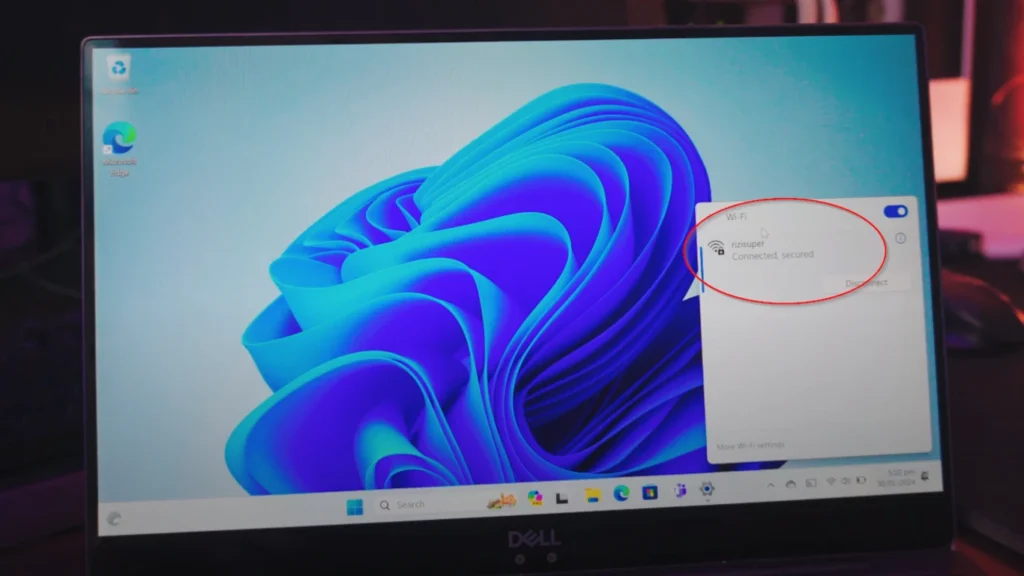
  • Connect the TV to the Same Wi-Fi Network

Connect your TV to the exact same wifi network as your laptop. As you can see, my TV and my Laptop both are on my Home Wi-Fi.
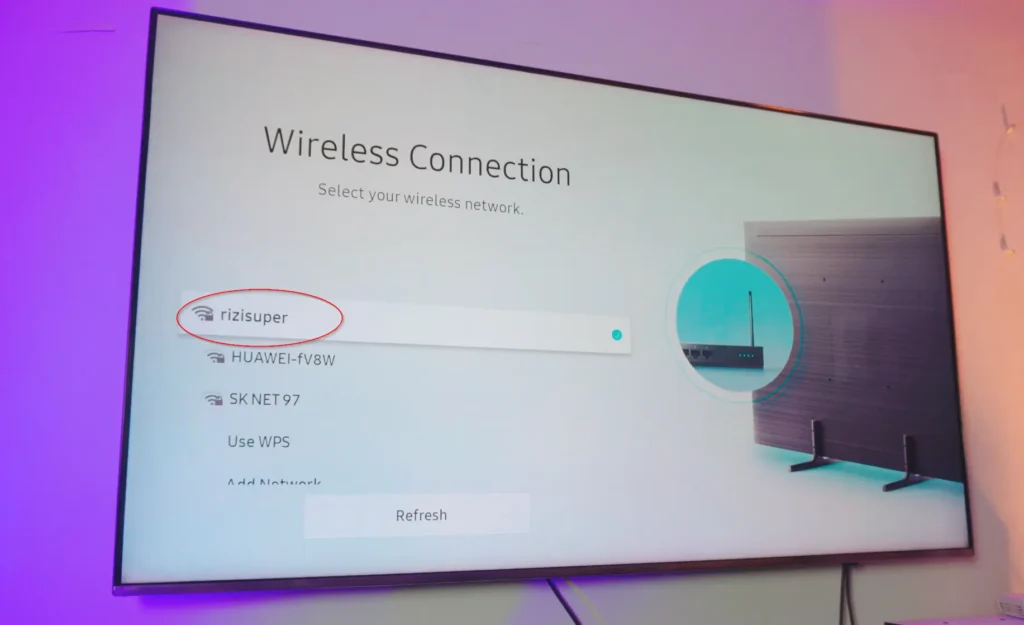
  • Screen Mirror Settings on Windows Laptop

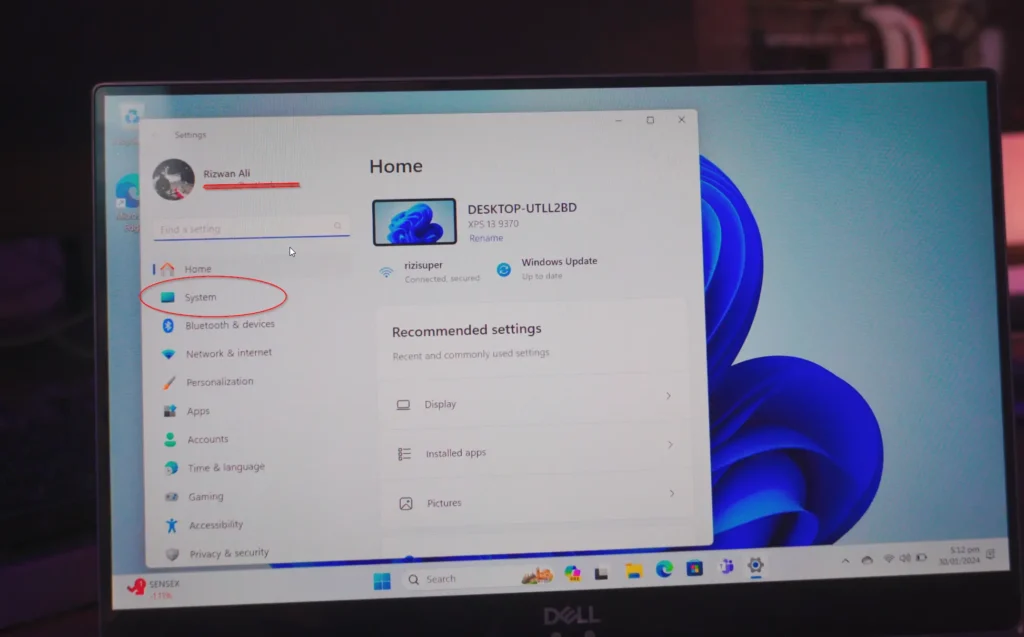
Once your Laptop and TV are both on the Same network, now it’s time to navigate to the settings in Windows where we can Screen Mirror Laptop to TV wirelessly and for free.

Go to Settings > System
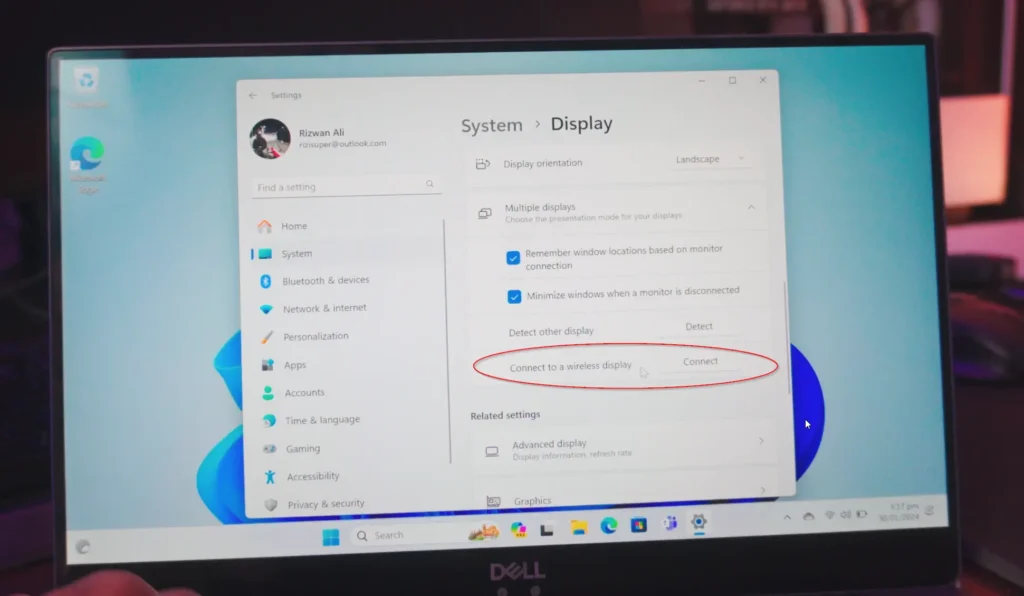
Go to Settings > System > Display > Connect to a Wireless Display
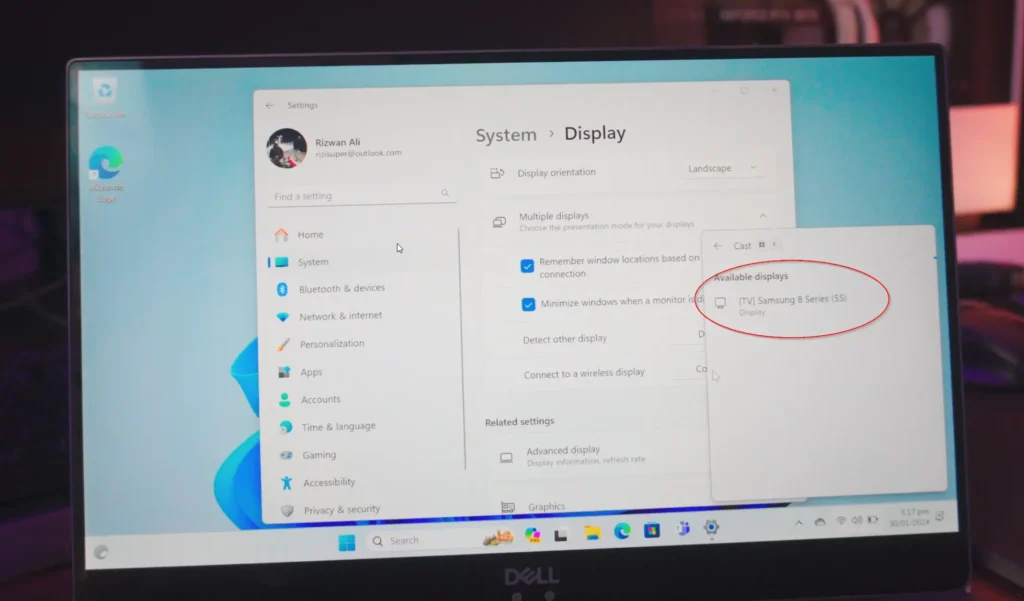
Select your TV from the Cast Menu and we’re connected. We can now Screen Mirror Laptop Screen to TV wirelessly and free.
Screen Mirroring Special Features:

You can get even more with this.

  • Press WIN+P on your Laptop Keyboard and you’ll get 3 different options

Duplicat – Basically duplicates your Screen from your Laptop onto TV

Extend – Converts your TV screen into a second monitor-kinda thing, you can move applications between Laptop Screen to TV screen and it’ll be a completely different screen. You got 2 Screens to play with

Screen Mirroring Laptop to TV: Wired vs. Wireless

There are two main avenues for screen mirroring:

  • Wired Connection: The classic HDMI cable remains a reliable option. Simply plug one end into your laptop’s HDMI port and Switch your TV source to that HDMI and you’re connected.
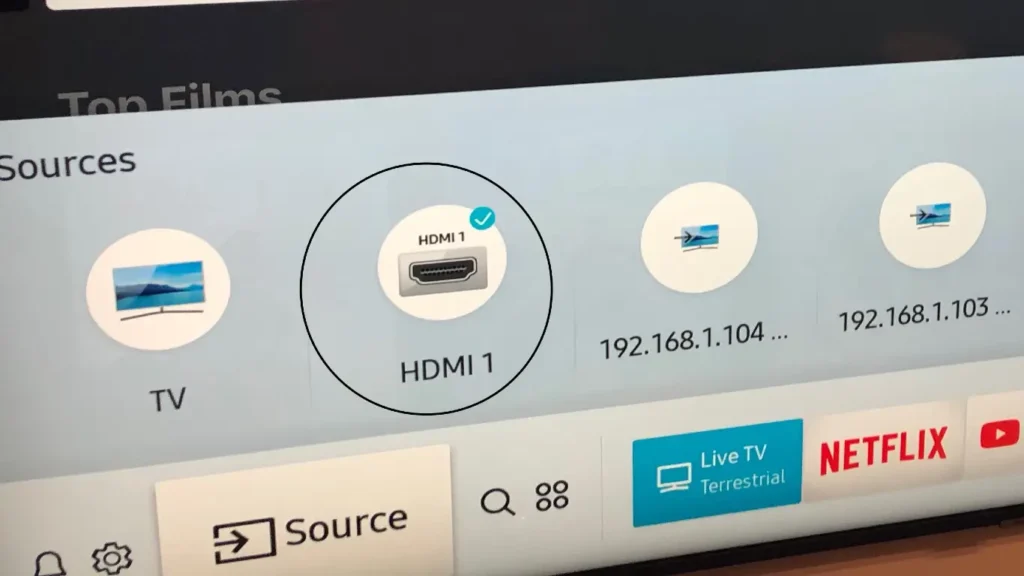
Although it’s pretty fast and reliable but it’s just not as clean as I’d like to call it. Having to handle cables/wires everywhere, can’t even move without being careful with the cables I mean, you get the point, right?
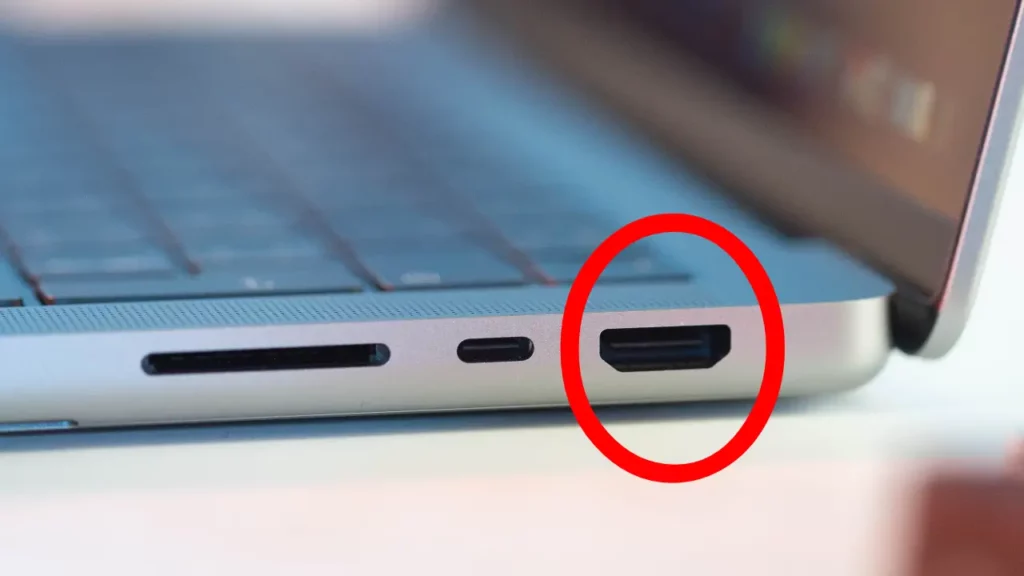
screen mirror laptop to tv via hdmi
  • Wireless Connection: Ditch the cables and embrace the freedom of wireless technologies like Miracast or Wi-Fi Direct. These features allow your laptop and TV to connect directly over Wi-Fi, eliminating the clutter.

Wireless Connection is easy to handle and manage and of course, it’s my favourite way to Mirror Laptop Screen to TV. So let’s do that!

Screen Mirroring Laptop to TV with Miracast:

  1. Check Compatibility: Ensure both your laptop and TV support Miracast. Most modern Windows laptops and Smart TVs do, but a quick online search can confirm.
  2. Projecting the Screen: Press the Windows Key + P on your laptop. This opens the “Project” menu.
  3. Choose Your TV: Select “Connect to a wireless display” and wait for your TV to appear.
  4. Connect and Enjoy: Click on your TV, and the mirroring begins!

A detailed Article here: How to Screen Mirror Laptop to TV Wirelessly

YouTube Tutorial:

Conclusion:

How To Connect or Mirror Laptop Screen To any TV without Wifi or HDMI cables. Completely wireless and 100% Free. Learn to Screen Mirror Windows Laptop Screen to any TV absolutely free and completely wirelessly!

SummarizeShare276

Related Posts

Ads-have-been-limited
Uncategorized

How to Fix YouTube Invalid Traffic

Ads have been limited on one or more of your videos due to Invalid Traffic On 7th April I was...

April 9, 2026
How to Screen Mirroring iPhone 15
iOS

How to Screen Mirroring iPhone 15

Watch new Tutorials on How-To Screen Mirror on Youtube every Week! How to Screen Mirroring iPhone 15: Screen Mirroring iPhone...

November 6, 2023
Next Post
Ads-have-been-limited

How to Fix YouTube Invalid Traffic

Recommended

how to control pc from iphone

How to Control PC/Laptop from iPhone (& PC to iPhone)

May 19, 2022
How to Screen Mirror iPhone to Roku Express

How to Mirror iPhone Screen to Roku Express

October 30, 2021
How To Screen Mirror iPhone Screen to Windows 10 or 11

How To Screen Mirror iPhone Screen to Windows 10/11

April 11, 2024
Screen Mirroring Windows 11 Laptop to TV

Screen Mirroring Windows 11 Laptop to TV (Wirelessly)

February 6, 2024

Categories

  • Android
  • featured
  • Featured posts
  • iOS
  • Macbook
  • Screen Mirroring
  • TV
  • Uncategorized
  • Windows

Instagram

    Go to the Customizer > JNews : Social, Like & View > Instagram Feed Setting, to connect your Instagram account.

Subscribe

Join over 12.000+ subscribers & be the first to get new freebies.

Disclaimer

This demo site is only for demonstration purposes to JNews WordPress theme. All images are copyright to their respective owners. All content cited is derived from their respective sources.

  • Home
  • Contact

Welcome Back!

Login to your account below

Forgotten Password?

Retrieve your password

Please enter your username or email address to reset your password.

Log In
No Result
View All Result
  • Apple
  • Samsung
  • Android
  • iOS
  • MacBook
  • Windows
Go to mobile version