
Screen Mirroring.
  • Apple
    • All
    • Android
    • featured
    • Featured posts
    • iOS
    • Macbook
    • Screen Mirroring
    • TV
    • Uncategorized
    • Windows
    Ads-have-been-limited

    How to Fix YouTube Invalid Traffic

    screen-mirror-laptop-to-tv

    How to Screen Mirror Laptop to TV – Complete Guide

    How to connect android phone to smart tv 2026 complete guide

    How to Connect Android Phone to Smart TV (2026 Complete Guide)

    iOS 26 Friendly Wallpapers

    iOS 26 Friendly Wallpapers for you!

    Transform Your iPhone: Create a Dark & Aesthetic Theme

    Transform Your iPhone: Create a Dark & Aesthetic Theme

    How to Screen Mirror Motorola to TV

    How to Connect & Screen Mirror Motorola to TV

    How to Screen Mirror Tecno Android Phone to TV

    How to Screen Mirror Tecno Android Phone to TV

  • Samsung
  • Android
  • iOS
  • MacBook
  • Windows
No Result
View All Result
Freebies.
  • Apple
    • All
    • Android
    • featured
    • Featured posts
    • iOS
    • Macbook
    • Screen Mirroring
    • TV
    • Uncategorized
    • Windows
    Ads-have-been-limited

    How to Fix YouTube Invalid Traffic

    screen-mirror-laptop-to-tv

    How to Screen Mirror Laptop to TV – Complete Guide

    How to connect android phone to smart tv 2026 complete guide

    How to Connect Android Phone to Smart TV (2026 Complete Guide)

    iOS 26 Friendly Wallpapers

    iOS 26 Friendly Wallpapers for you!

    Transform Your iPhone: Create a Dark & Aesthetic Theme

    Transform Your iPhone: Create a Dark & Aesthetic Theme

    How to Screen Mirror Motorola to TV

    How to Connect & Screen Mirror Motorola to TV

    How to Screen Mirror Tecno Android Phone to TV

    How to Screen Mirror Tecno Android Phone to TV

  • Samsung
  • Android
  • iOS
  • MacBook
  • Windows
No Result
View All Result
Freebies.
No Result
View All Result
Home Android

Screen Mirroring Samsung to Sony TV

May 14, 2023
in Android, Screen Mirroring
566 36
Screen Mirroring Samsung to Sony TV
This image has an empty alt attribute; its file name is rizisuper-3.jpg

Watch new Tutorials on How-To Screen Mirror on Youtube every Week!

Learn to Screen Mirror your Samsung smartphone to any TV with a few simple steps!
Optional:
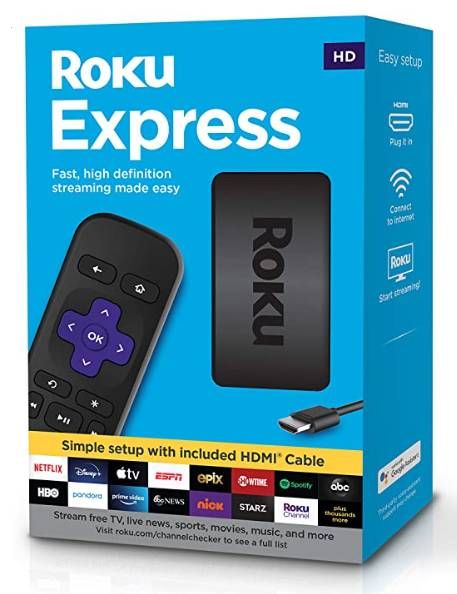
Turn your normal TV into a Smart-TV with just a simple MiraScreen Dongle!

Screen Mirroring on TV

1. Samsung Phone

Compared to other phones, Samsung has the simplest screen mirroring process out there. You don’t need to download anything to make this work, as Samsung has Screen Mirroring built-in their Android skin on top of Stock Android for Samsung smartphones as well as Samsung TVs’.

2. Screen Mirroring on TV

Before we head into the Settings make sure your TV has Screen Mirroring built-in (Does your TV have Screen Mirroring)? Or you could be using Chrome-Cast in that case head over to Screen Mirroring Articles for more info.

Heading to Screen Mirroring on Your TV

Now then once you’ve checked your TV supports Screen Mirroring.

Either click on the “Source” button on your remote control to select the Screen Mirroring Mode or you can head over to wireless/device settings on your TV and then select Screen Mirroring (as shown below)

Screen Mirroring on Your Phone

To access Screen Mirroring on your smartphone. Swipe down the control panel on your phone and select Screen Mirroring (as shown below)

Once selected, it’ll automatically look for TVs nearby.

Screen Mirroring in Settings

In case you can’t find the screen mirroring in the Control Panel. Try heading to Settings and either search for “Screen Mirroring” or you can also navigate to the Wireless Device Settings. From there you’ll be able to access the Hotspot setting as well as Screen Mirroring Settings. So just click on it and it’ll automatically look for TVs nearby.

Conclusion:

Screen Mirroring using your Samsung smartphone just got easier now, with built-in features like Screen Mirroring in Samsung smartphones you can now mirror with ease!

Video Tutorial:

SummarizeShare334

Related Posts

How to connect android phone to smart tv 2026 complete guide
Android

How to Connect Android Phone to Smart TV (2026 Complete Guide)

Watch new Tutorials on How-To Screen Mirror on Youtube every Week! A complete guide on How to Connect an Android...

January 29, 2026
How to Screen Mirror Motorola to TV
Android

How to Connect & Screen Mirror Motorola to TV

Watch new Tutorials on How-To Screen Mirror on Youtube every Week! How to Connect & Screen Mirror Motorola to TV:...

April 30, 2025
How to Screen Mirror Tecno Android Phone to TV
Android

How to Screen Mirror Tecno Android Phone to TV

Watch new Tutorials on How-To Screen Mirror on Youtube every Week! How to Screen Mirror Tecno Android Phone to TV:...

April 30, 2025
How to Screen Mirror Samsung Galaxy S25 Ultra to TV
Android

How to Screen Mirror Samsung Galaxy S25 Ultra to TV

Watch new Tutorials on How-To Screen Mirror on Youtube every Week! How to Screen Mirror Samsung Galaxy S25 Ultra to...

March 18, 2025
Next Post
Screen Mirroring iPhone to Non-Android TV

Screen Mirroring iPhone to Non-Android TV

screen mirroring iphone to tcl roku tv

Screen Mirroring iPhone to TCL Roku TV

Recommended

Mirroring Netflix from iPhone to TV

Mirroring Netflix from iPhone to TV

April 14, 2023
How to Screen Mirror Samsung Galaxy S25 Ultra to TV

How to Screen Mirror Samsung Galaxy S25 Ultra to TV

March 18, 2025
Windows 11 Cast to TV

Windows 11 Cast to TV

November 20, 2023
Screen Mirroring Samsung Galaxy to Android TV

Screen Mirroring Samsung Galaxy to Android TV

July 11, 2023

Categories

  • Android
  • featured
  • Featured posts
  • iOS
  • Macbook
  • Screen Mirroring
  • TV
  • Uncategorized
  • Windows

Instagram

    Go to the Customizer > JNews : Social, Like & View > Instagram Feed Setting, to connect your Instagram account.

Subscribe

Join over 12.000+ subscribers & be the first to get new freebies.

Disclaimer

This demo site is only for demonstration purposes to JNews WordPress theme. All images are copyright to their respective owners. All content cited is derived from their respective sources.

  • Home
  • Contact

Welcome Back!

Login to your account below

Forgotten Password?

Retrieve your password

Please enter your username or email address to reset your password.

Log In
No Result
View All Result
  • Apple
  • Samsung
  • Android
  • iOS
  • MacBook
  • Windows
Go to mobile version